找回密码
 立即注册
搜索
热搜: 活动 交友 discuz
查看: 51|回复: 3

Fail to update firmware of miniware MDP-P906 DFU V4.04D

[复制链接]

1

主题

1

回帖

6

积分

新手上路

积分
6
发表于 2026-2-17 03:35:00 | 显示全部楼层 |阅读模式
I recently purchased an MDP-P906 power supply and attempted to update the firmware according to your instructions. However, I encountered the following problem:
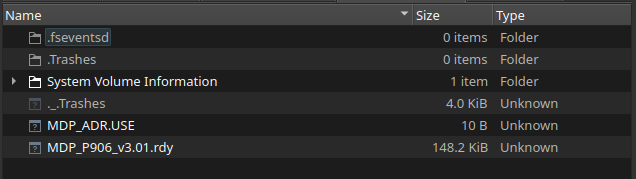
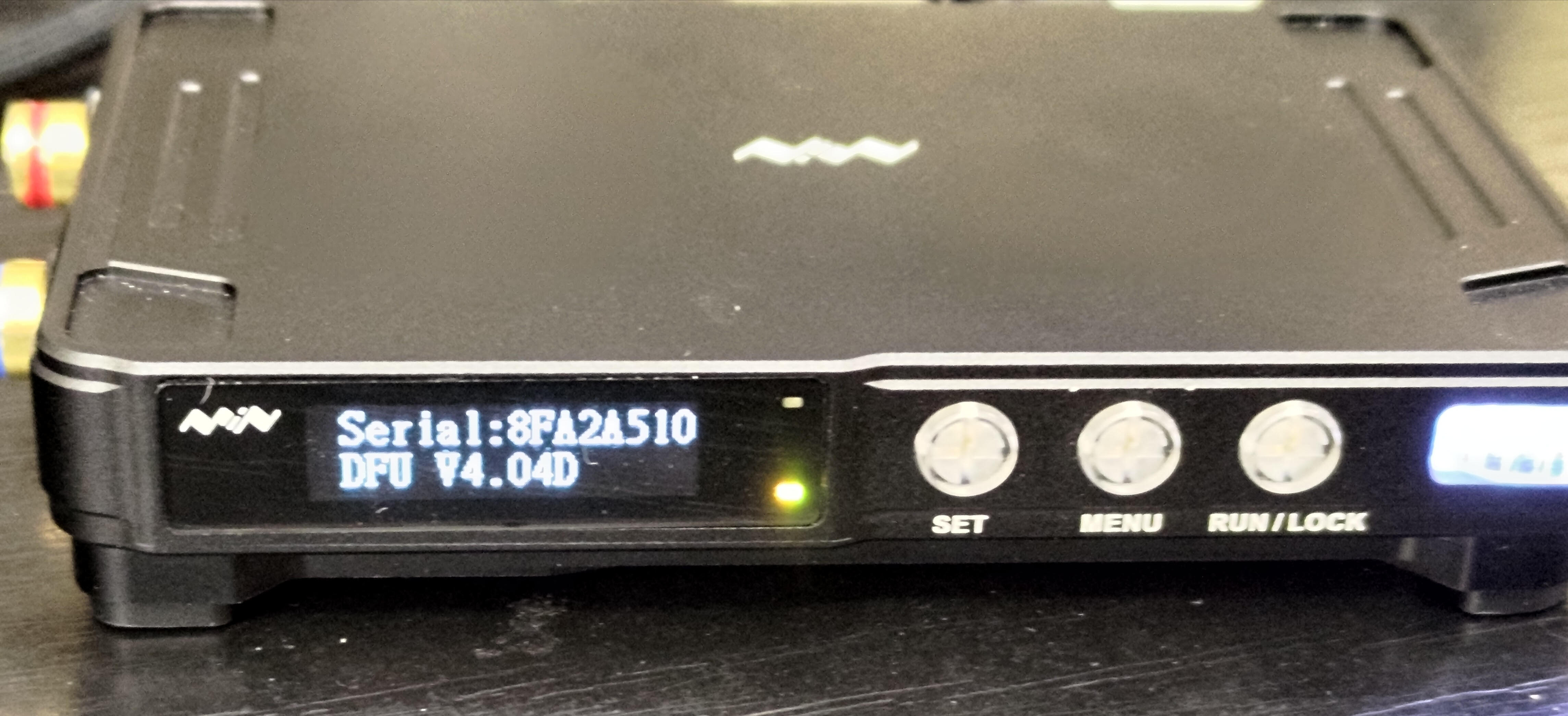
After copying the .ADR and .bin files and seeing them renamed to .USE and .rdy, I disconnected the USB-C cable and powered the unit from a 5V supply. The power supply now remains permanently stuck in DFU mode and does not respond to anything — neither button presses during startup nor any controls while powered on.
I have tried different firmware versions (1.32, 1.33, and 3.01), but it still only shows “Serial” and “DFU”.
I have also tried different USB 3.0 and USB 2.0 ports on different operating systems (Linux and Windows), but nothing helps.
How can I fix this issue? You also state that there is a 12-month warranty, and I have not even been able to use the device for two days. I wrote to service@minidso.com, but they haven't replied to me.
If I can't fix this, I will be very disappointed in this brand and will never buy from them again, because this device cost a lot of money, and in the end I got nothing — just money wasted.  
unnamed.png
unnamed.jpg


回复

使用道具 举报

206

主题

1504

回帖

3294

积分

管理员

积分
3294

社区居民忠实会员

发表于 6 天前 | 显示全部楼层
Can you try upgrading to Windows 10?
回复

使用道具 举报

1

主题

1

回帖

6

积分

新手上路

积分
6
 楼主| 发表于 5 天前 | 显示全部楼层
Yes, I tried connecting it to a computer with Windows 10 and exactly the same thing happens: after loading the .ADDR and .bin files, they change to .USE and .rdy, and after disconnecting from the computer and connecting it to power, the display shows “Serial” and “DFU V4.04” with no response to any button presses.
The only method that worked for me was using an ST-Link V2 thru SWDIO and SWCLK pins of microcontroller with an adapter to the Micro-Jack connector on the back and flashing the firmware MDP-P906_v3.01.rdy to address 0x08008000 (the one specified in the .ADDR file), but then another problem appeared. The voltage regulator no longer works properly. When I set Vset to 0.230V, the output voltage is 0.330V, which is also confirmed by a multimeter measuring the output. When I set Vset = 0.240V, the output jumps to 30.5V. The current limit is also not functioning, although the measurements themselves are correct. The calibration constants remain the same as they were right after purchase, and the .cfg files are not corrupted. It seems that bootloader doesn't see any calibration files (.CFG and .PRM) in the memory
Probably that in the latest version of the power supply with bootloader DFU V4.04, you changed something in the voltage and current regulation loops or addresses where the calibration constants are read - either in the hardware or in the software - and because of that, the firmware is not working correctly with the current hardware.
Could you please provide the latest firmware version for the MDP-P906, as well as the bootloader DFUV4.04 or newer so that I can finally get it working? Right now it feels like I paid a lot of money for a brick that I can't even use properly.
回复

使用道具 举报

206

主题

1504

回帖

3294

积分

管理员

积分
3294

社区居民忠实会员

发表于 5 天前 | 显示全部楼层
Yes, I tried connecting it to a computer with Windows 10 and exactly the same thing happens: after loading the .ADDR and .bin files, they change to .USE and .rdy, and after disconnecting from the computer and connecting it to power, the display shows “Serial” and “DFU V4.04” with no response to any button presses.
The only method that worked for me was using an ST-Link V2 thru SWDIO and SWCLK pins of microcontroller with an adapter to the Micro-Jack connector on the back and flashing the firmware MDP-P906_v3.01.rdy to address 0x08008000 (the one specified in the .ADDR file), but then another problem appeared. The voltage regulator no longer works properly. When I set Vset to 0.230V, the output voltage is 0.330V, which is also confirmed by a multimeter measuring the output. When I set Vset = 0.240V, the output jumps to 30.5V. The current limit is also not functioning, although the measurements themselves are correct. The calibration constants remain the same as they were right after purchase, and the .cfg files are not corrupted. It seems that bootloader doesn't see any calibration files (.CFG and .PRM) in the memory
Probably that in the latest version of the power supply with bootloader DFU V4.04, you changed something in the voltage and current regulation loops or addresses where the calibration constants are read - either in the hardware or in the software - and because of that, the firmware is not working correctly with the current hardware.
Could you please provide the latest firmware version for the MDP-P906, as well as the bootloader DFUV4.04 or newer so that I can finally get it working? Right now it feels like I paid a lot of money for a brick that I can't even use properly.

The update was successful, but the calibration file is invalid. Please email service@minidso.com and I will send you instructions on how to recalibrate.
回复

使用道具 举报

您需要登录后才可以回帖 登录 | 立即注册

本版积分规则

Archiver|手机版|MINIWARE产品技术交流 迷你工具-智能烙铁-加热平台-示波器-体感电动螺丝刀-数字电源-智能镊子 ( 粤ICP备07030012号-1 )

GMT+8, 2026-3-3 19:51 , Processed in 0.159517 second(s), 25 queries .

Powered by Discuz! X3.5

© 2001-2024 Discuz! Team.

快速回复 返回顶部 返回列表